





Technical Buyer’s Guide · Microsoft 365 Migrations
Choosing a Microsoft 365 migration company should not come down to comparing a price per user or checking whether a Microsoft logo appears on its website. A migration can affect Exchange Online, OneDrive, SharePoint, Teams, Microsoft Entra ID, domains, applications, devices, Power BI, Power Platform, and security. The provider needs to understand how all of these components interact and what happens when one of them cannot be moved directly.
A technically sound proposal should explain what will be migrated, what will not, which tools will be used, how administrative access will be protected, how the process will be tested, what will happen during cutover, and how the provider will demonstrate that the information is correctly available in the target environment.
This guide brings together 15 technical criteria for choosing a Microsoft 365 migration company and a 100-point scorecard you can use to compare Microsoft 365 migration consultants and providers before awarding the project.
Are you comparing companies for a Microsoft 365 migration?
Before comparing prices alone, make sure every proposal covers the same scope. At MSAdvance, we review users, mailboxes, OneDrive, SharePoint, Teams, identities, domains, applications, devices, and security requirements before finalizing the migration strategy.
How do you choose a Microsoft 365 migration company?
A good Microsoft 365 migration company should meet at least 15 criteria: perform a pre-migration assessment; understand all workloads in scope; clearly state exclusions and limitations; design the target architecture and identity model; select tools according to the scenario; run a pilot; plan coexistence and sequencing; document cutover and rollback; use least-privilege administrative access; address GDPR and data processing requirements; define validation criteria; estimate timelines based on volume and throttling; prepare the end-user and device experience; provide governance, reporting, and hypercare; and be able to demonstrate relevant expertise and comparable projects.
A Microsoft certification or a well-known migration tool are positive indicators, but neither replaces these controls. The best migration consultancy is the one that can explain precisely what will happen before, during, and after the move, and how it will verify that the target environment works correctly.
Quick scorecard: 100 points for comparing Microsoft 365 migration companies
This scorecard makes it possible to compare proposals using consistent technical criteria. The weighting is indicative, but it forces the evaluation to look beyond price alone.
| # | Criterion | Weight | What the provider should demonstrate |
|---|---|---|---|
| 1 | Assessment and discovery | 10 | A real inventory before finalizing scope and design. |
| 2 | Workload expertise and exclusions | 10 | Knows what can be migrated, what is only partially supported, and what must be recreated. |
| 3 | Target architecture and dependencies | 8 | Does not treat the project as a simple data copy. |
| 4 | Identity, domain, and DNS | 8 | A clear plan for Entra ID, UPNs, groups, domain transfer, and mail flow. |
| 5 | Tooling strategy | 7 | Chooses Microsoft-native tools, third-party solutions, Graph, or PowerShell according to the requirement. |
| 6 | Real pilot | 7 | Tests representative users and workloads before production migration. |
| 7 | Coexistence and sequencing | 8 | Understands dependencies between Exchange, Teams, OneDrive, and SharePoint. |
| 8 | Cutover, contingency, and rollback | 8 | Detailed runbook, named owners, and decision criteria. |
| 9 | Administrative access security | 8 | Least privilege, limited access, and auditable administration. |
| 10 | Data protection and compliance | 6 | Clear DPA, subprocessors, tooling, and data-processing arrangements. |
| 11 | Validation and acceptance | 8 | Defines how it will prove that the migration has been completed correctly. |
| 12 | Technical timeline estimation | 5 | Considers data volume, item counts, throttling, and real service capacity. |
| 13 | End users and endpoints | 5 | Covers Outlook, OneDrive, Teams, MFA, and Intune. |
| 14 | Governance, reporting, and support | 4 | Roles, tracking, escalation, hypercare, and documentation. |
| 15 | Expertise and verifiable references | 3 | Partner status, certifications, and genuinely comparable projects. |
85–100 points
Technically strong provider. The remaining differences should mainly come down to the proposal, assigned team, and specific commercial terms.
70–84 points
Potentially a good option, but any gaps should be explicitly resolved before signing.
55–69 points
Significant risk. Some aspects of the project are probably still not sufficiently defined.
Below 55
We would not recommend awarding a complex migration without revisiting the scope, methodology, and responsibilities.
Is hiring a Microsoft Partner enough for a Microsoft 365 migration?
No. Being a Microsoft partner or holding a Microsoft designation is a positive indicator, but it does not by itself prove specific experience with the type of migration your organization requires.
The Solutions Partner for Modern Work designation does provide relevant information. Microsoft currently requires partners to achieve at least 70 points out of 100 and evaluates three areas:
- partner performance;
- skilling and certifications;
- customer success.
Workloads associated with Modern Work include Exchange Online, Microsoft Intune, SharePoint Online, Teams, and Microsoft Entra ID.
It is therefore a useful indicator of broad capability.
However, an organization preparing a 3,000-user carve-out involving Teams, Power BI, applications, and multiple domains should also verify whether the assigned team has actually worked with those kinds of dependencies before.
Official source: Microsoft — Solutions Partner for Modern Work.
1 Does the company perform an assessment before finalizing the migration?
A Microsoft 365 migration company should inventory the environment before definitively setting the scope, tools, price, and schedule.
At a minimum, it should request information about:
- users;
- user mailboxes;
- shared mailboxes;
- online archives;
- OneDrive accounts;
- SharePoint sites;
- Microsoft Teams;
- Teams chats if they are in scope;
- groups;
- domains;
- Intune;
- applications;
- Power BI and Power Platform where applicable;
- holds and retention;
- hybrid identity;
- target date.
Microsoft lists identity, workload dependencies, coexistence, licensing, and timeline planning among the key considerations for a tenant-to-tenant migration.
2 Does the provider genuinely understand the workloads in scope and explain what CANNOT be migrated?
A competent provider should be able to explain Exchange, OneDrive, SharePoint, Teams, Planner, Power BI, Intune, Power Platform, Entra ID, and security separately.
The answer “yes, we migrate the whole Microsoft 365 environment” is far too vague.
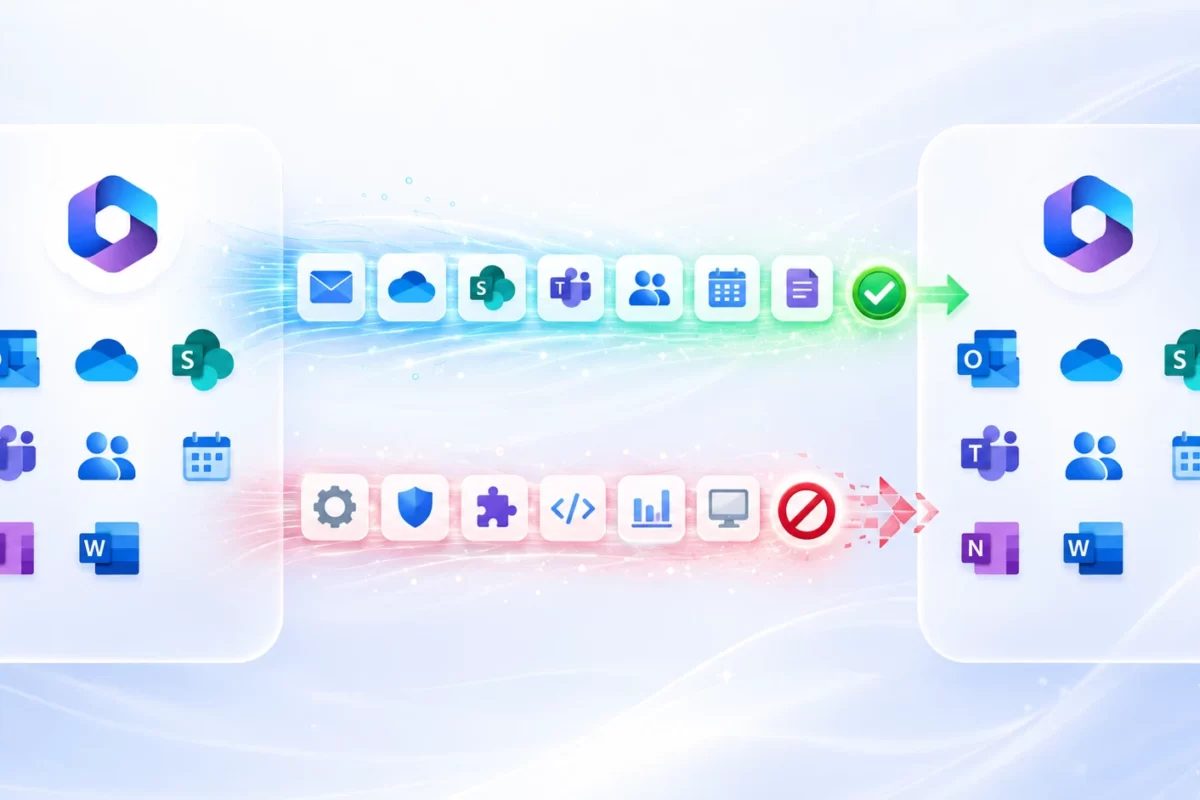
Microsoft provides different migration capabilities for different workloads, and some objects need to be recreated or adapted rather than moved directly.
Useful questions include:
- what Exchange content is actually included?
- what happens to shared mailboxes and delegations?
- what happens to OneDrive permissions and sharing?
- how are Teams and channels handled?
- what happens to Planner?
- is Power BI migrated or rebuilt?
- do Intune devices automatically move to the new tenant?
- what happens to Conditional Access?
- what happens to Enterprise Applications?
Be cautious of any provider promising a “100% identical Microsoft 365 environment in the target tenant” without qualifications. Some services simply do not support a true 1:1 migration.
You can explore this topic in more detail in the MSAdvance Microsoft 365 tenant-to-tenant migration guide.
3 Does the provider design the target tenant or simply copy data?
A migration should not begin by copying information before the desired target environment has been defined.
This includes decisions about:
- identity model;
- UPNs and domains;
- SharePoint structure;
- Teams and Groups;
- naming conventions;
- licensing;
- Conditional Access;
- guest access;
- external sharing;
- retention;
- applications;
- Intune;
- administrative roles.
In a consolidation project, copying every group, site, and exception from the previous tenant exactly as it is can simply transfer years of technical debt into the new environment.
4 Does it have a clear identity, domain, and DNS strategy?
Identity and domain management are two of the most sensitive parts of a Microsoft 365 migration.
The provider should be able to explain:
- how target users will be created;
- how identity mapping will be performed;
- what will happen to UPNs and primary SMTP addresses;
- how users synchronized from Active Directory will be handled;
- what will happen to Microsoft 365 Groups;
- when the domain will be moved;
- which references must be removed beforehand;
- how MX, SPF, DKIM, and DMARC will be changed;
- which applications use the domain;
- what will happen to mail flow during coexistence.
In a tenant-to-tenant migration, Microsoft requires organizations to define how source and target identities will be mapped and how any domain transfer will be managed.
Asking “who changes the MX record?” is not enough. The important question is who has already validated that users, aliases, groups, SMTP applications, and routing are ready so that changing the record does not break email delivery.
5 Does it choose the migration tool after understanding the project?
A consultancy should select migration tools according to each workload and requirement rather than forcing the entire project to fit a single platform.
Microsoft currently describes three main approaches:
- coordinated multi-workload migration;
- individual cross-tenant migration tools;
- partner or third-party tools for complex scenarios.
A strong Microsoft 365 migration provider should understand:
- Migration Orchestrator;
- Cross-Tenant Mailbox Migration;
- Cross-Tenant OneDrive Migration;
- Cross-Tenant SharePoint Migration;
- Microsoft Graph;
- PowerShell;
- specialized migration tools when they add value.
There is nothing unusual about combining methods. In many projects, it is the correct approach.
You can also read our guide to tools and scripts for Microsoft 365 tenant-to-tenant migrations.
6 Does it include a real pilot before cutover?
A significant migration should be tested with representative users and data before the process is extended to the rest of the organization.
A good pilot should cover different scenarios:
- standard user;
- large mailbox;
- shared mailbox or mailbox delegations;
- OneDrive with permissions;
- user who belongs to Teams;
- user with application dependencies;
- managed device if Intune is in scope;
- known special cases.
The pilot provides real information about:
- actual throughput;
- errors;
- queue times;
- permission behavior;
- end-user experience;
- Outlook, OneDrive, and Teams issues;
- support requirements.
“The tool has already been tested” is not a substitute for a pilot. What needs to be tested is not just the software: it is the specific combination of your source environment, target environment, data, and configuration.
7 Does it understand coexistence and workload dependencies?
In phased migration projects, the source and target tenants may need to coexist for weeks or even months.
Microsoft explicitly highlights the need to plan:
- mail routing between tenants;
- free/busy availability;
- Teams federation;
- workload sequencing.
There are also important dependencies:
- Teams depends on Exchange in certain scenarios;
- OneDrive and SharePoint share permission models;
- Teams uses SharePoint for files;
- Planner can depend on a Microsoft 365 Group;
- Power BI and Power Platform may depend on users or groups whose identities are changing.
A proposal should explain the sequence of the workloads rather than simply present a list of migration jobs.
Official source: Microsoft — Workload dependencies and coexistence.
8 Is there a cutover runbook and contingency plan?
The final migration window should not depend on an engineer remembering every step. There should be a runbook defining tasks, sequence, owners, validations, and decisions.
A migration runbook should cover:
- start time;
- freeze period, if applicable;
- final delta migrations;
- domain transfer;
- DNS;
- mail routing;
- licensing;
- user renaming;
- validations;
- communications;
- support;
- go/no-go criteria;
- contingency actions.
Does rollback simply mean going back?
Not always. Some migration operations may not be easily reversible once they have been completed.
That is why a good contingency plan must specify what can be reversed, what can be postponed, and how service continuity will be maintained if part of the cutover cannot be completed.
9 How does the provider protect administrative access?
An external company should not request permanent Global Administrator access when the required tasks can be completed using more limited or temporary roles.
Microsoft recommends following the principle of least privilege.
For partners, GDAP provides:
- granular access;
- specific administrative roles;
- limited duration;
- explicit customer authorization.
Microsoft Entra Privileged Identity Management also enables organizations to use:
- Just-In-Time access;
- time-limited access;
- approval workflows;
- MFA for activation;
- activation auditing.
This does not mean a migration will never require elevated privileges. Some operations do require them. The difference is how those privileges are granted, for how long, and who uses them.
Essential question: “Which administrative roles do you need, who will have access, for how long, and when will those permissions be removed?”
Official sources: Microsoft — GDAP · Microsoft Entra PIM.
10 Where does the data go, and what about GDPR and subprocessors?
If a consultancy or migration tool processes information belonging to employees, customers, or third parties, data protection must be part of both the project and the contract.
For organizations subject to the GDPR, it is important to clarify:
- who acts as the data processor;
- which data is processed;
- for what purpose;
- which third-party tools are involved;
- which subprocessors are used;
- where the information may be processed;
- what happens to temporary data;
- when it is deleted;
- which security measures are applied;
- how a data-related incident would be handled.
The European Commission explains that processing carried out by a processor must be governed by a contract and that engaging a subprocessor requires the appropriate authorization from the controller.
“The migration tool is cloud-based” is not an answer to a compliance question. You need to know what data it stores, where it is stored, for how long, and under what conditions.
Official source: European Commission — GDPR controller and processor responsibilities.
11 How will the provider prove that the migration completed successfully?
“Job completed successfully” should not be the only acceptance criterion.
Validation should take place at several levels.
Quantitative validation
- users processed;
- mailboxes;
- items;
- data volume;
- files;
- errors;
- skipped items.
Functional validation
- Outlook;
- mail flow;
- calendar;
- OneDrive;
- permissions;
- SharePoint;
- Teams;
- business-critical applications;
- devices if they are in scope.
Business validation
Some elements should be accepted by users or service owners.
A migration can show 100% of migration jobs completed and still leave a critical application broken. This is why acceptance criteria should be defined before cutover.
12 Are the timeline estimates technically justified?
Be cautious both of a provider that says everything will take months without measuring anything and one that promises to migrate thousands of users in a single weekend based only on the number of accounts.
Microsoft states that migration timelines depend on factors including:
- number of users;
- mailbox sizes;
- OneDrive data volume;
- SharePoint data volume;
- workload type;
- batch size;
- holds;
- network conditions;
- service capacity.
SharePoint and OneDrive apply throttling, and Exchange also uses service throttling and resource-management mechanisms.
The provider should therefore explain:
- how the estimated timeline was calculated;
- what throughput it expects;
- what will be measured during the pilot;
- what contingency margin is included;
- which workloads will run in parallel;
- what will happen if Microsoft applies throttling.
13 Does the proposal cover end users and devices?
A migration does not end when the data reaches the target tenant. It ends when people can work.
The proposal should clarify what happens to:
- Outlook;
- OneDrive Sync;
- Teams;
- MFA;
- bookmarks and URLs;
- Office;
- mobile devices;
- Windows;
- Microsoft Intune;
- Entra Join;
- Autopilot;
- support during the first sign-in.
If Intune is in scope, the provider should understand that moving to another tenant may require device re-enrollment and that the procedure varies according to the platform and enrollment method.
Useful question: “On Monday morning after cutover, exactly what does each user need to do, and who helps them if something does not work?”
14 Is there project governance, reporting, and hypercare?
An enterprise migration needs governance as well as technical expertise.
The proposal should clearly define:
- Project Manager;
- technical lead;
- customer point of contact;
- RACI or responsibilities;
- status meeting frequency;
- risk register;
- decision log;
- status of each migration batch;
- incident escalation;
- support window;
- hypercare;
- final documentation;
- removal of administrative permissions;
- closure or decommissioning of the source environment where appropriate.
What should appear in the Statement of Work?
At a minimum:
- scope;
- exclusions;
- provider responsibilities;
- customer responsibilities;
- tools;
- licenses included or excluded;
- acceptance criteria;
- assumptions;
- working windows;
- post-migration support.
A short proposal is not necessarily a bad proposal. The concern is an ambiguous proposal where nobody can later determine whether Planner, chats, external permissions, or devices were actually included.
15 Can the provider demonstrate relevant expertise and comparable projects?
Certifications, Microsoft partner designations, and references should be used as supporting evidence, not as a substitute for a solid methodology.
Check:
- the provider’s actual relationship with Microsoft;
- current partner designations;
- certifications held by the assigned team;
- Exchange experience;
- SharePoint and Teams experience;
- Microsoft Entra ID experience;
- Intune experience if it is in scope;
- migration tools the team genuinely knows how to use;
- projects of a similar size;
- projects of the same type: M&A, carve-out, consolidation, Google → M365, Exchange → M365, etc.
A better question than “How many migrations have you completed?”
Ask:
“Have you recently completed a migration with a scope similar to ours, and what were the main challenges?”
The answer is usually far more useful than a headline number.
A good provider should be able to talk about real problems: throttling, identity matching, permissions, calendars, domains, Teams, conflicting files, VIP users, applications, or complicated cutovers. A migration with no exceptions mainly exists in sales presentations.
MSAdvance, for example, publishes a Microsoft 365 tenant-to-tenant migration case study explaining its methodology, coexistence approach, migration waves, and validation process.
10 red flags when choosing a Microsoft 365 migration company
If several of these signs appear in a proposal, it is worth reviewing the project before awarding it.
- The quote is based only on the number of users without asking about workloads or data volume.
- The provider promises to migrate “all of Microsoft 365” without explaining limitations.
- There is no assessment or pilot.
- The provider requests permanent Global Administrator access without justification.
- It does not explain where the migration tool processes your data.
- It does not distinguish SharePoint from Teams.
- It cannot clearly explain identity mapping and domain transfer.
- It does not define how the result will be validated.
- It promises “zero risk,” “zero data loss,” or guaranteed speeds without conditions.
- The project ends at the exact moment of cutover with no hypercare or closure phase.
20 questions to ask a Microsoft 365 migration company
These questions work particularly well in an RFP or technical meeting:
- What do you need to inventory before finalizing the scope?
- Which workloads do you consider to be in scope?
- Which elements do not support a 1:1 migration?
- Which tool do you propose for each workload, and why?
- Which Microsoft-native migration capabilities will you use?
- How will you prepare identity mapping?
- How will the domain transfer be performed?
- How will email work during coexistence?
- How will Teams and SharePoint be handled?
- How will Planner, Power BI, or Power Platform be migrated or recreated if they exist?
- Which users will be included in the pilot?
- How will you measure throughput?
- Which administrative permissions do you require?
- Do you use PIM or GDAP where applicable?
- What information does the migration platform store?
- What happens to external collaborators and permissions?
- What are the go/no-go criteria?
- How will each workload be validated?
- What support will be available after cutover?
- Can you show us a comparable project?
How should you compare Microsoft 365 migration quotes?
Do not compare the total price until you have confirmed that every proposal includes exactly the same workloads and responsibilities.
Two quotes can both say “migration of 500 users” while describing completely different projects.
| Item | Provider A | Provider B |
|---|---|---|
| Exchange User Mailboxes | Included? | Included? |
| Shared Mailboxes | Included? | Included? |
| Online Archives | Included? | Included? |
| OneDrive | Included? | Included? |
| SharePoint | Per site / data volume? | Per site / data volume? |
| Teams | Which components? | Which components? |
| Chats | Included? | Included? |
| Planner | Included? | Included? |
| Power BI | Included? | Included? |
| Intune | Policies? Devices? | Policies? Devices? |
| Identity and Groups | Included? | Included? |
| Domain and DNS | Included? | Included? |
| Pilot | Included? | Included? |
| Migration tools | License included? | License included? |
| Hypercare | How much? | How much? |
The apparently more expensive proposal may ultimately cost less if it includes workloads, licenses, pilot testing, validation, and support that another provider has excluded.
How does MSAdvance approach a Microsoft 365 migration?
At MSAdvance, we aim to make the migration tool a consequence of the assessment rather than the starting point.
Our methodology is divided into:
- Assessment: inventory of users, data, workloads, and dependencies.
- Design: target tenant, identity, collaboration, security, and coexistence.
- Technology selection: Microsoft-native capabilities, specialized tools, Graph, or PowerShell depending on the scope.
- Pilot: validation of the migration process with representative users.
- Preparation: identities, licenses, groups, DNS, and target locations.
- Migration: pre-stage and delta passes where supported by the technology.
- Cutover: execution of the runbook and final changes.
- Validation: technical and functional review.
- Hypercare: post-migration support and exception remediation.
- Closure: documentation and controlled removal of access and decommissioning of the source environment where appropriate.
For tenant-to-tenant projects, you can review our Microsoft 365 tenant-to-tenant migration service and our technical tenant-to-tenant migration guide.
Are you comparing migration providers?
If you send us the project scope or a proposal you are currently evaluating, we can prepare our alternative with the workloads, methodology, tools, assumptions, and responsibilities clearly defined so you can make a like-for-like comparison.
Frequently asked questions about choosing a Microsoft 365 migration company
How do you choose a Microsoft 365 migration company?
Compare assessment capabilities, workload-specific experience, architecture, identity planning, migration tools, pilot testing, coexistence, cutover methodology, administrative security, GDPR compliance, validation, timeline estimation, end-user support, project governance, and references. Price and Microsoft Partner status should be additional criteria rather than the only factors.
Is it important for the migration company to be a Microsoft Partner?
Yes, it is a positive indicator. Microsoft uses designations such as Solutions Partner for Modern Work to recognize capabilities across performance, skilling, and customer success. However, you should also verify that the assigned team has specific experience with the type and scale of migration your organization requires.
What certifications should a Microsoft 365 migration company have?
It depends on the project scope. Expertise in Microsoft 365, Exchange Online, Microsoft Entra ID, SharePoint, Teams, security, and Intune is particularly relevant when these workloads are included. More important than the total number of certifications is whether the engineers actually assigned to the migration hold the relevant credentials and experience.
Should a Microsoft 365 migration company perform an assessment?
Yes. It should inventory users, mailboxes, OneDrive, SharePoint, Teams, groups, domains, devices, and other dependencies before finalizing the strategy. The number of users alone does not accurately represent the complexity of a migration.
Is a migration pilot mandatory?
There is no universal requirement to run a pilot, but for a significant migration it is highly recommended. A pilot makes it possible to test performance, mapping, permissions, the end-user experience, and real migration errors before extending the process to the entire organization.
Which tools should a Microsoft 365 migration company use?
There is no single correct tool for every project. Microsoft provides native migration capabilities for Exchange, OneDrive, SharePoint, and other scenarios; specialized migration platforms can provide coexistence, pre-staging, reporting, or broader workload coverage; and Microsoft Graph and PowerShell can automate specific configuration tasks. The tooling should be chosen according to the actual scope.
Is it better to use Microsoft-native migration tools?
Microsoft-native tools are an excellent option when their scope matches the project’s requirements. In other projects, combining them with specialized tools may be more efficient. Microsoft explicitly recognizes the use of partners and third-party migration tools for complex migrations or when internal resources are limited.
Does the migration consultancy need Global Administrator access?
Some migration tasks may require elevated privileges, but permanent Global Administrator access should not be maintained without a genuine need. Microsoft recommends the principle of least privilege, and mechanisms such as GDAP and PIM can provide more granular or temporary administrative access where the scenario allows it.
What is GDAP, and why does it matter when hiring a Microsoft partner?
GDAP stands for Granular Delegated Admin Privileges. It allows a Microsoft partner to receive specific, time-limited administrative roles instead of permanent global access. It helps reduce administrative risk and supports the principle of least privilege.
What should a Microsoft 365 migration quote include?
It should identify the workloads included, quantities, migration tools, licenses, identity and DNS tasks, pilot, migration activities, cutover, validation, post-migration support, exclusions, customer responsibilities, and the assumptions used to calculate the price.
How should you compare two Microsoft 365 migration quotes?
Normalize the scope first. Check whether both proposals include the same user mailboxes, shared mailboxes, OneDrive accounts, SharePoint sites, Teams, chats, groups, Planner, Power BI, Intune, identity, domain work, migration tools, and support. Only then does it make sense to compare the total price.
Is the cheapest Microsoft 365 migration company usually worse?
Not necessarily. A consultancy may be more efficient or have a different cost structure. The problem arises when the lower price is the result of excluding workloads, migration tools, validation, or support that will later prove necessary.
What should you ask about the migration cutover?
Ask what happens during the final migration window, which data will already have been moved, who will handle the domain and DNS changes, how mail flow will be validated, what the go/no-go criteria are, which actions are reversible, and what procedure will be followed if part of the migration does not finish on time.
Can a Microsoft 365 migration be completed without downtime?
The goal should be to minimize disruption rather than promise absolute zero downtime without first understanding the environment. Pre-staging, coexistence, delta migrations, pilots, and out-of-hours cutovers can significantly reduce the impact, but some sensitive operations depend on the specific migration scenario.
How do you verify that no data is missing after a migration?
By performing both quantitative and functional validation. Item counts, data volume, errors, and skipped objects should be reviewed, while mail, calendars, permissions, OneDrive, SharePoint, Teams, and relevant applications should also be tested. Acceptance criteria should be agreed before cutover.
What support should the company provide after the migration?
There should be a defined hypercare period with clear owners, support hours, and escalation procedures. It is also advisable to include final documentation, remediation of exceptions, removal of administrative access, and criteria for closing or decommissioning the source environment.
What happens with GDPR during a Microsoft 365 migration?
If the provider or the tools used process personal data on behalf of the organization, the relevant obligations should be reviewed, including data processor responsibilities, subprocessors, security measures, processing instructions, and deletion of data after the service has been completed.
How can you tell whether a migration company has real experience?
Ask for examples of projects with comparable source environments, scale, and workloads, and ask what problems arose and how they were resolved. You can also review certifications, Microsoft partner designations, published case studies, and the experience of the engineers who will actually be assigned to your project.
How many migration companies should you compare?
For a significant project, comparing several genuinely qualified proposals using the same scope and technical questions is usually enough. Comparing a large number of poorly normalized offers provides less useful information than comparing three proposals based on an equivalent Statement of Work.
Can MSAdvance deliver a complete Microsoft 365 migration?
MSAdvance delivers Microsoft 365 migration projects from assessment and design through execution, cutover, validation, and hypercare, combining Microsoft-native capabilities, specialized migration tools, Microsoft Graph, and PowerShell according to the scenario and workloads in scope.
Official resources for evaluating a Microsoft 365 migration company
- Microsoft — Plan a Microsoft 365 tenant-to-tenant migration — identity, workload dependencies, coexistence, tooling, and migration planning.
- Microsoft 365 Migration documentation — general documentation covering Microsoft migration capabilities.
- Solutions Partner for Modern Work — current requirements for the Microsoft designation.
- Microsoft GDAP — granular and time-limited administrative access for Microsoft partners.
- Microsoft Entra Privileged Identity Management — least privilege and Just-In-Time administrative access.
- Microsoft FastTrack Data Migration — migration scope, responsibilities, and considerations.
- European Commission — GDPR controller and processor responsibilities.
Related MSAdvance guides
Conclusion: which company should you choose for a Microsoft 365 migration?
The best Microsoft 365 migration company is not necessarily the one offering the lowest price per user, using the best-known migration tool, or displaying the largest number of logos on its website.
It is the company that can give clear, specific answers to these questions:
- what is actually in my environment?
- what can and cannot be migrated?
- what will the target environment look like?
- which tools will be used, and why?
- how will administrative access be protected?
- how will the source and target environments coexist?
- what will happen during cutover?
- how will the result be validated?
- what will users experience on the following Monday?
- what support will be available when an exception appears?
Microsoft certifications and partner designations help narrow down the options. References help build confidence. But the assessment, methodology, access controls, clarity of scope, and validation criteria are what genuinely reduce project risk.
That is why providers should be compared using a normalized scope and technical criteria such as the 15 covered in this guide.
Would you like to compare our proposal with other Microsoft 365 consultancies?
Tell us about your environment and the number of users, mailboxes, OneDrive accounts, SharePoint sites, Teams, domains, and devices. We will prepare a scope explaining what is included, which migration approach we recommend, and which dependencies should be reviewed before cutover.